⚠ For accredited professionals only. These steps must only be carried out by a licensed electrician holding current CEC solar accreditation. Changing inverter settings such as power reduction / export limiting affects grid compliance and safety. WISE Energy provides this guide for reference only, cannot warrant its accuracy or suitability for your installation, and accepts no liability for any loss, damage or non-compliance arising from its use. Always follow Fronius documentation and your local network and regulatory requirements.
This guide shows how to access the Power Reduction menu on a Fronius SnapINverter (Primo / Symo) using the access code.
1
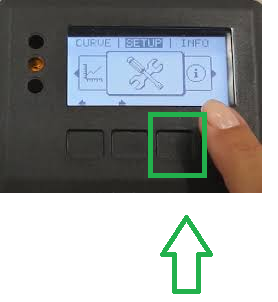
With the inverter switched on, tap the button 3rd from the left5 times to bring up the code request.Tap the 3rd button from the left five times
2
Using the up and down arrows, enter the access code:
77634
3
Press Enter.
4
You are now in the Power Reduction menu — proceed as required, following Fronius documentation and the relevant network rules.
Need a hand? Call the WISE Energy team on 1300 368 331.