Deye Hybrid Inverter Wi-Fi Setup
Please note. This guide is general help for connecting your inverter to Wi-Fi. Do not change any electrical or grid settings yourself — for those, use a licensed electrician with CEC solar accreditation. WISE Energy provides this guide for reference only and cannot warrant its accuracy for your specific system.
Just had a Deye hybrid inverter installed (like the popular Deye Sun 6kW LV Hybrid)? Getting it online so you can watch your solar and battery from your phone takes about 5 minutes. Follow these steps — no tech knowledge needed.
First, find your Wi-Fi logger
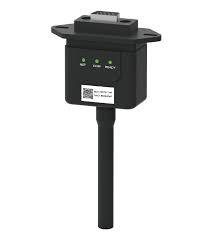
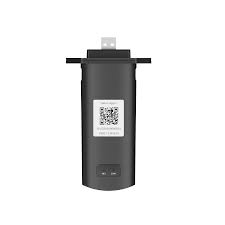
It is the small stick that plugs into the bottom of your Deye inverter. Yours will look like one of these two types — both work exactly the same way. The serial number / QR code you will need is printed on the side.
Method 1 — Using the Deye Cloud / Solarman app
This is the easiest way to set up or reconnect your system.
1
Download the app
Install Deye Cloud or Solarman Smart from the App Store or Google Play.
2
Connect your phone to home Wi-Fi
Make sure your phone is on your 2.4GHz home Wi-Fi (not 5GHz). Most modern routers broadcast both.
3
Open the app and find your Logger
Log in, go to your device / plant, open the Logger tab, and tap Wi-Fi Configuration (sometimes called "Networking").
4
Choose your Wi-Fi and enter the password
The app finds your home network. Select it, type your Wi-Fi password, and tap Start to Configure / Next.
5
Connect to the inverter hotspot if asked
If prompted, open your phone's Wi-Fi settings and join the logger hotspot named AP_XXXXXX (XXXXXX = your logger serial number). If it asks for a password, it's on the logger sticker, or try 12345678.
6
Done!
Go back to the app. It reboots the logger and shows "Configuration Succeeded". Your system is now online — you can monitor it from anywhere.
Tip: The logger needs 2.4GHz Wi-Fi — if setup fails, check you didn't pick a 5GHz network, and that the inverter is switched on.
Stuck? No problem — call the WISE team on 1300 368 331 and we'll talk you through it, or we can do it remotely.
Simple step-by-step: get your Deye hybrid inverter online with the Deye Cloud / Solarman app.
Commenting is not enabled on this course.